
Setting up a webhook subscription
- Go to Integrations → Webhooks.
- Click Create New.
- Enter your endpoint URL. It must be HTTPS — Raven will not deliver to unencrypted endpoints.
- Select the event types you want delivered to this subscription (see Event types below).
- Click Save. Your subscription is created and immediately active.
Each account can have up to 10 webhook subscriptions.
Your signing secret
When you create a subscription, Raven generates a unique secret key and shows it to you once. Copy and store it securely — you won't be able to view it again.
Use this secret to verify that a delivery genuinely came from Raven: every request includes a Webhook-Signature header in the form sha256=<signature>, computed as an HMAC-SHA256 hash of the raw request body using your secret as the key. Recompute the same hash on your end and compare it to the header before trusting the payload.
If your secret is ever compromised, use Rotate Secret on the subscription to generate a new one. This immediately invalidates the old secret — update your endpoint before the next delivery, or verification will start failing.
Event types
Raven currently supports webhook events for Issues, Notes, and Checklists:
- issue.created - A new Issue is logged
- issue.updated - An Issue's title, priority, category, location, log, notes, resolution, or linked media/records change
- note.created - A new Note is logged
- note.updated - A Note's details, log, or linked media/records change
- checklist.created - A new Checklist is started
- checklist.updated - A Checklist's title, status, log, task completion, or linked records change
Filtered event delivery
Each event is evaluated independently using the record’s values at the time that event occurs.
Filtering does not backfill events or generate synthetic events. If a record does not match its filter when it is created, Raven does not later generate a created event when the record begins matching.
For example:
-
An Issue is created without a Category.
-
The subscription filters issue.created with no categories applied and issue.updated to Category = Facilities.
-
The Issue is later assigned the Facilities Category.
Raven does not deliver issue.created, because the Issue did not match when it was created. Raven will deliver the later issue.updated event because the Issue now matches.
Your integration must not assume that a created event always arrives before an updated event. With filters enabled, issue.updated, note.updated, or checklist.updated may be the first event received.
If only a filtered created event is selected and the record does not match at creation, it will not be delivered later through that subscription.
Unfiltered events continue to be delivered normally.
Payload structure
Every delivery is a JSON envelope:
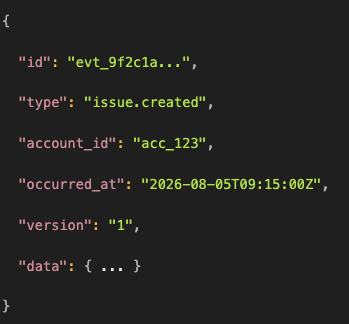
- id is a unique identifier for this specific delivery event — distinct from the entity's own id inside data.
- type matches the event type you subscribed to.
- occurred_at is when the underlying change happened in Raven, in ISO 8601. Raven does not guarantee delivery order across events — if ordering matters to your integration, reconcile using occurred_at rather than assuming arrival order.
Example data for an issue.created event:
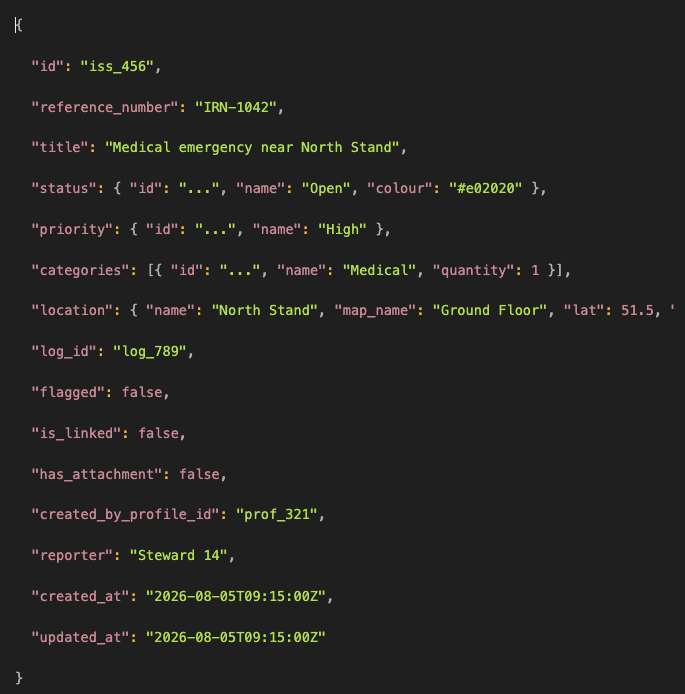
Note and Checklist payloads follow the same conventions with fields relevant to that record type — Checklists additionally include total_tasks, completed_tasks, and percent_complete so you can track progress without a separate call back to Raven.
Testing your endpoint
Before relying on live traffic, use Send test event on any subscription to trigger a one-off synchronous test delivery. You'll see immediately whether your endpoint accepted it (HTTP 200) or rejected/timed out, so you can confirm your URL, signature verification, and server are all working before going live.
Delivery retries and automatic disabling
If your endpoint doesn't respond successfully, Raven retries the delivery automatically — up to 5 attempts per event, spaced out on an increasing schedule (immediate, then roughly 30 seconds, 1 minute, 2 minutes, and 4 minutes later). Transient failures (server errors, timeouts, rate limiting) are retried on this schedule; once an attempt succeeds, no further retries happen for that event.
If a subscription fails all 5 attempts on 3 separate events in a row, Raven automatically disables it and sends you a notification — this protects against endlessly retrying against an endpoint that's fundamentally broken. Re-enable the subscription once your endpoint is fixed.
Viewing the delivery log
Each subscription has its own delivery log, showing every attempt with its event type, status, response code, and when the underlying event occurred. Filter by event type or status to find what you need. Delivery history is retained for 30 days.
Troubleshooting
- Not receiving anything? Check the subscription is active (not auto-disabled) and subscribed to the event type you expect — Raven only delivers events you've explicitly selected.
- Signature verification failing? Confirm you're hashing the raw, unparsed request body, and that you've updated your stored secret after any rotation.
- Endpoint receiving duplicates or out-of-order events? Use the event id to de-duplicate and occurred_at to reorder — Raven does not guarantee exactly-once delivery or cross-event ordering.
-
Filtered events missing: Check that the record matched all populated filter fields when the event occurred.